The best Business Suite software in India, built to help your business grow. Contact us at +91-8882435276.
[ Contact ]
Phone number
Email address
Head office
Noida office
[ Get in touch ]
Share a few details and the right team at TriostackOne will get back to you.
Add organizations and domains, manage users and email aliases, and see each one's status in a single place.
Switch between All, Unread, and Starred, snooze or star messages, and read with attachments in the reading pane.
Spam, phishing, and virus filtering with a clear log of what was blocked and what was allowed.
Triostack Mail gives every team a professional, custom-domain inbox with folders, labels, contacts, and spam protection built in. Because it's part of TriostackOne, it links emails with CRM leads, contacts, and opportunities instead of leaving them in a separate tool.
🔥 We have 40,000+ business mailboxes hosted on Triostack Mail.
Works with
Professional @yourcompany.com addresses, with organizations, domains, users, and aliases managed together.
Folders, labels, and a shared contacts directory keep conversations easy to find.
Link Triostack CRM and connect Google Workspace, Microsoft 365, and Slack.
Add the organizations and domains your team sends from, manage the users on each, and set up email aliases. See every organization with its domain, user count, and active or pending status.
Work through email in a clean inbox with All, Unread, and Starred views. Read with attachments and pinned messages in the reading pane, and star or snooze anything you need to come back to.
Write from any of your addresses with To, Cc, and Bcc, rich-text formatting, links, images, and tables. Attach files, schedule a send, protect a message, or save a draft and finish later.
Organize mail into folders and labels, with counts for every one. Keep Clients, Work, Finance, HR, and Projects apart, and create a new folder in a click.
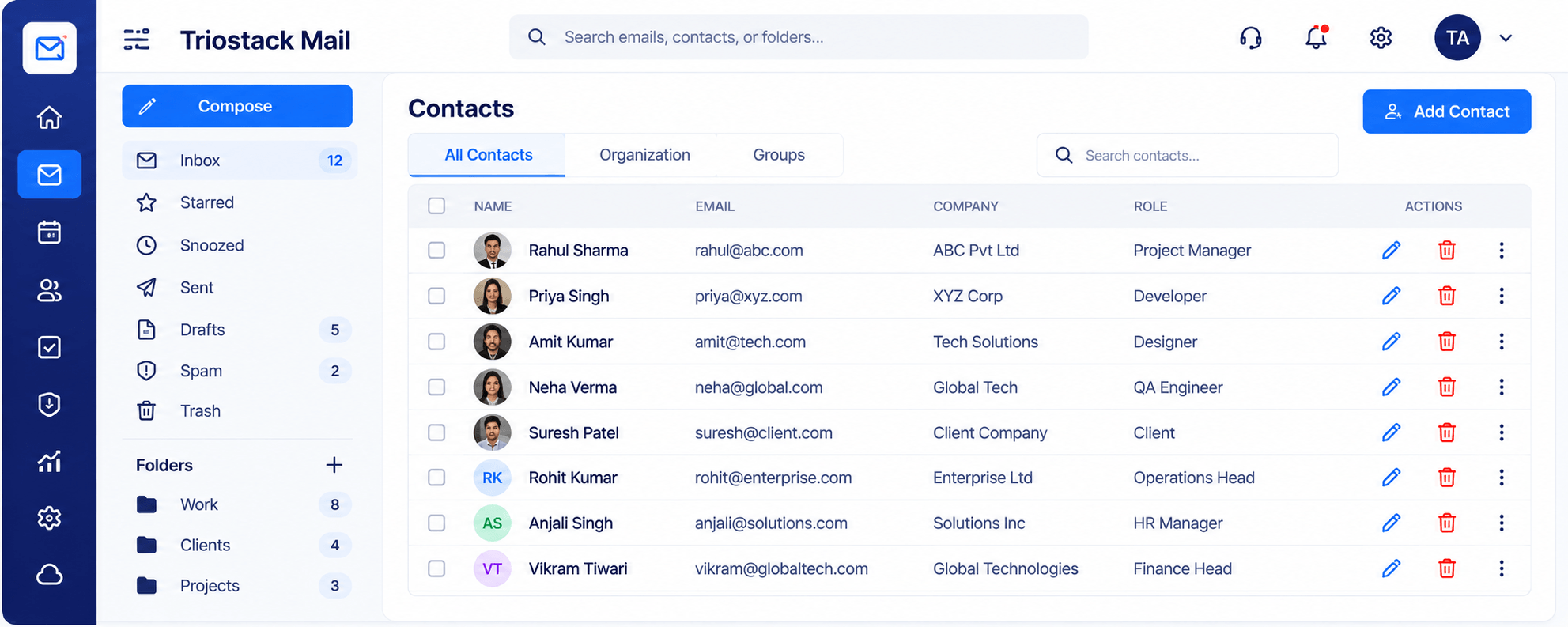
Keep every contact in one directory with name, email, company, and role. Search, edit, or remove contacts, and organize them by organization and group.
See safe emails, spam blocked, viruses blocked, and your protection rate for the month. Review recent activity such as blocked phishing, infected attachments, and new sign-ins, and manage the spam filter and blocked senders.
Set your display name, time zone, language, and date format, then add a signature, an auto reply, forwarding, and filters and rules so mail sorts itself.
Connect Google Workspace, Microsoft 365, Triostack CRM, and Slack. Then track emails sent, delivered, and blocked over time, and see your top senders in one report.
Run mail for one or several organizations on your own domains, with users and aliases managed centrally.
Link emails with CRM leads, contacts, and opportunities so every reply starts with the full story.
Block spam, phishing, and infected attachments, and review exactly what was stopped.
Because every app runs on the same platform, data moves between them without manual exports.
Built for these industries
Security
Single sign-on shared across the whole platform.
Control exactly who can see and edit data in Mail.
Data is protected in transit and at rest.
“Moving our sales and delivery teams onto one platform cut out a lot of the manual handoff work between CRM and project tracking.”
Start free today, or talk to our team about rolling out the full Business Suite.
Grow your business by building, referring, or reselling with Triostack.